

System Restore Manager 2.0
Restore your Windows PC to a prior point by selecting a restore point and clicking the Restore button
Program info
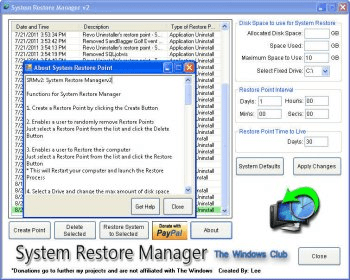
System Restore Manager is a software that allows users to create restore points on their Windows PC and restore their computer to a prior restore point. It also allows users to delete unwanted restore points and save the ones they want. Categories include Automation, Backup & Restore, Battery Utilities, Benchmark, Calculators, CD & DVD Software, Clipboard Tools, Device Assistants, Disk Management, File Compression, File Managers, Fonts, Gadgets & Widgets, Network, Plugins & Addons, Remote Computing, System Optimization, Virtualization, and Drivers.
Create a Restore Point on the fly, by clicking the Create Button. Restore your Windows PC to a prior restore point. Just select a Restore Point from the list and click the Restore Button. This will Restart your computer and launch the Restore Process. See all the available restore points. Selectively remove Restore Points you don’t want and save the one’s you want. Just select a Restore Point from the list and click the Delete Button.
Details
Extensions

No information available
The data will be available later.Old versions

No information available
The data will be available later.


![Download Chrysanth Cheque Writer [Free] for Pakistan](https://img.informer.com/icons/png/16/7042/7042325.png)

Comments